Start with a preset you know.
See the amp and effects behind a familiar preset.
Mustang LT25 preset editor for Mac
A bigger canvas for your LT25 presets.
Familiar controls. Room to explore.
No installation. Mac app in development — no public download yet.
Visual demo · No audio or USB · Edits stay in this tab
Choose a preset, then select Adjust Gain.
Local preset Unmodified preview


Select an amp or pedal to zoom in
Keep exploring. Your changes stay in this preview.
See Mac App AvailabilityIllustrative controls. Reloading clears this preview.
Meet the Mac appLess squinting at a small screen. More room to find the sound in your head.
See the amp and effects behind a familiar preset.
Turn a knob or enter an exact value. One detail at a time.
Name your local preset for a song, a lesson, or a new idea.
The Mac app · In development
Four steps. Room to experiment.
Choose a step to look closer.
Connect an LT25 with a USB data cable, then choose Connect amplifier in the Mac app.
Browse the presets read from your amp. Open one as a starting point without activating it on the amplifier.
Make small changes with visual controls or exact values. Edits stay local and do not change the amp’s sound live.
Keep your work on your Mac for another session. Saving to an eligible amplifier is a separate step with a backup and destination review.
The native app · In development
Familiar shortcuts. Local presets. A little space to create.
 Rupicola Amp StudioNative macOS workspace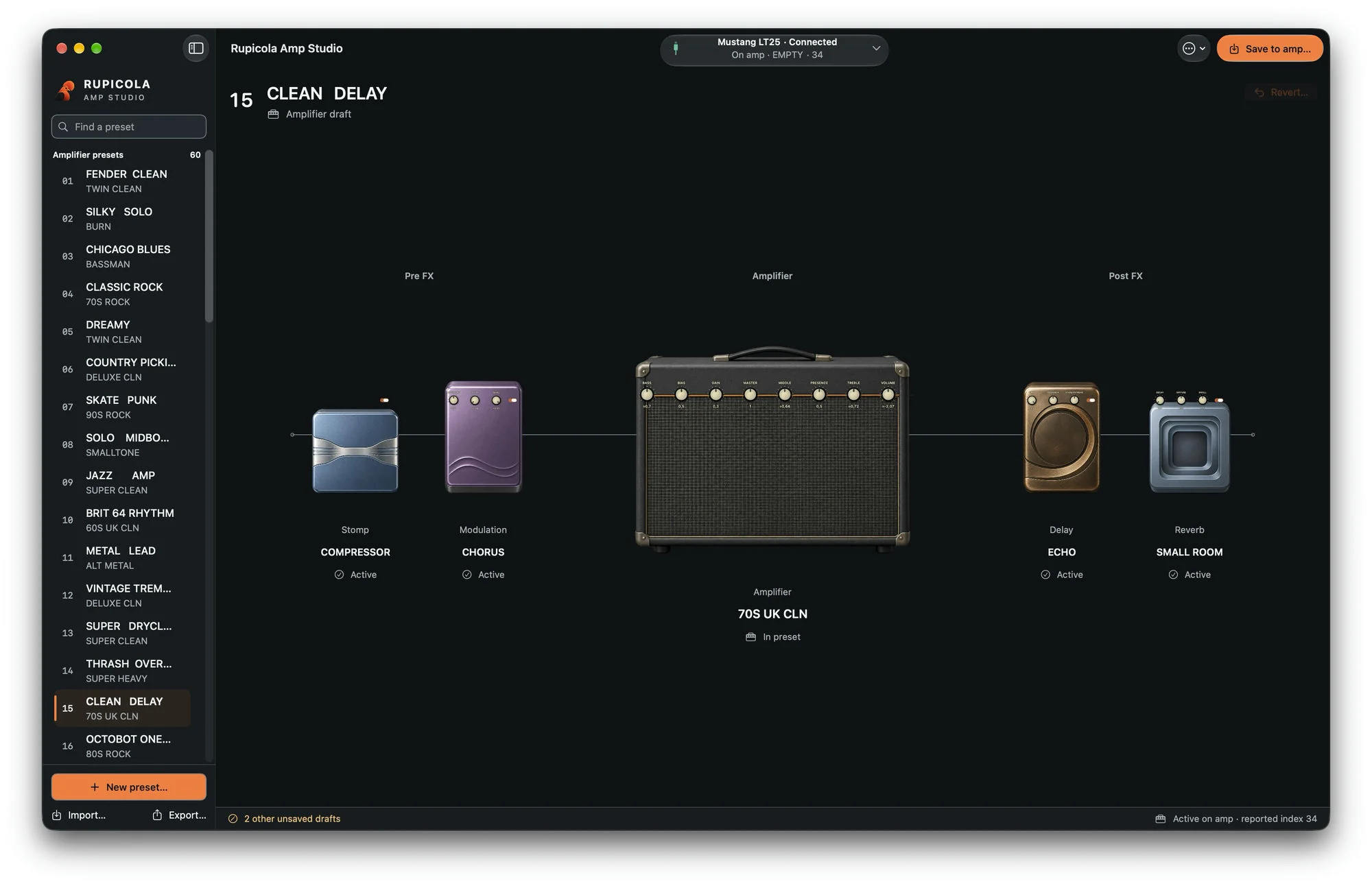
Availability & compatibility
Available now
Try the controls. No installation, audio playback, or USB connection.
Try the DemoIn development
Public download not yet available.
Limited hardware validation
Saving is currently limited to one individually validated LT25.
Physical validation covers one specific LT25 on firmware 2.1.4. Matching the firmware alone does not enable saving. USB data cable required. LT50 and Rumble LT25 are not supported.
What you can try today, and what to expect from the Mac app.
Try the interactive concept preview on this page, without installing anything or creating an account. Choose an example preset, select the amp, and adjust a control. Values are illustrative and edits last only in this tab; reloading clears them.
No. The browser demo lets you try the interface; it does not play audio or connect to USB. Rupicola is a preset editor, not an amp simulator or recording app. In the native app, knob changes also stay local until a separate, eligible save to the amplifier.
The Mac app is in development. A public download is not available yet, and no release date has been announced. The browser demo is available now.
The native app targets the Fender Mustang LT25 and macOS 14 or later, initially on Apple Silicon. Current physical validation covers a specific LT25 on firmware 2.1.4, not every unit or firmware version. Saving requires an individually eligible device; matching the firmware alone is not enough. LT50 and Rumble LT25 are not supported.
In the Mac app, edits stay in a local draft and do not change the amp’s sound live. On an eligible device, Save to amp includes a fresh backup, destination review, explicit confirmation, and read-back verification. Saving also activates the destination preset. An uncertain write is never reported as saved. Local drafts remain available if you unplug the amp.
The Mac app’s local editing and preset import/export work offline without an account. The browser demo needs a connection to load, then keeps its edits in the current tab. Sending files through email or an online service has its own connection requirements.
The Mac app imports and exports compatible .rupicola files, which you can send through AirDrop, email, or a file-sharing service. Importing creates a local copy; it does not authorize a hardware save. Fender Tone file import is not supported. The browser demo’s JSON files cannot be imported into the native app. There is no built-in cloud hosting or online marketplace.
No. Rupicola Amp Studio is independent software developed by Limbatus and is not affiliated with or endorsed by Fender. Fender and Mustang names are used only to identify amplifier compatibility.
Pick a preset. Turn a knob. See how it feels.
Try the DemoVisual browser demo · No installation · No audio playback